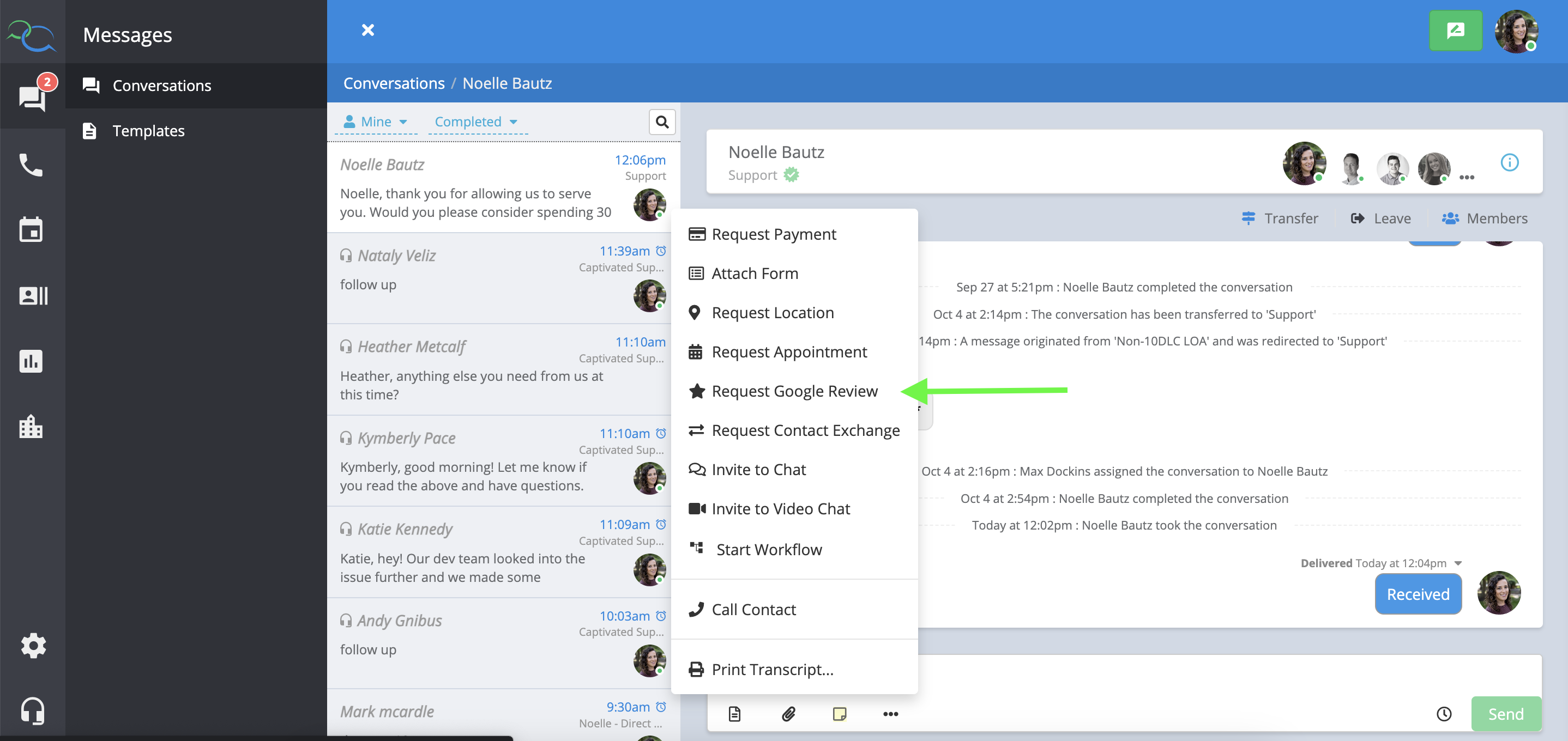
Send Google review requests directly from Captivated and make it easy for customers to share feedback about their experience.
Customer reviews can help build trust, provide valuable feedback, and strengthen your business’s online presence. Captivated makes it easy to send customers a direct link to leave a Google review following an interaction with your business.
A review request doesn’t need to be complicated.For example:
Thanks for choosing ABC Business! We’d appreciate your feedback about your experience. If you have a moment, you can leave us a Google review using the link below.
Or:
Hi {{salutation}}, thank you for trusting us with your service today. We’d love to hear about your experience. Would you mind taking a moment to leave us a Google review?
Using Merge Fields such as {{salutation}} can help make your request feel more personal.
For a more conversational approach, you can ask the customer before sending the review link.For example:
Would it be okay if I sent you a link to share your experience with us on Google?
If the customer agrees, send your Google review request.This keeps the interaction personal rather than making the review request feel automated.Depending on your account configuration, you can filter review activity by:
Date
Star rating
Location
Team member
This can help your organization understand review activity and identify opportunities to consistently ask customers for feedback.
Make review requests part of a consistent customer experience.
Ask for honest feedback, rather than specifically requesting a positive or 5-star review.
Keep your request short and conversational.
Send the request at a natural point in the customer journey.
Make sure the review link directs customers to the correct Google Business Profile.
Avoid offering incentives in exchange for reviews.
Don’t discourage customers from leaving a review based on their expected rating.
Don’t selectively ask only customers who indicate they’re happy or satisfied.
Businesses should not screen customers based on their expected rating and only direct satisfied customers to Google. Give customers an equal opportunity to share their honest experience.
Captivated’s Professional Services team can help create customer satisfaction or NPS surveys to gather additional feedback about the customer experience.Surveys can be used to:
Measure customer satisfaction.
Gather additional feedback.
Alert a manager when a customer reports a poor experience.
Trigger follow-up workflows based on customer responses.
Contact Captivated Support to learn more about available survey and automation options.
If you need assistance setting up Google review requests or connecting the appropriate Google Business Profile, contact Captivated Support using the Support option within Captivated.